


CrownPlay Casino - Sign Up and Login Guide
You want to get from “just browsing” to actually playing in a couple of minutes, right? This guide walks you through how to sign up, log in and keep your CrownPlay Casino account safe from start to finish.
Introduction
When you create a personal CrownPlay account, you are basically unlocking the full version of our casino and sportsbook instead of just window shopping. With one EUR balance and a single login, you can jump between casino, live casino, jackpots, sports, live betting, tournaments, challenges, Bonus Crab and the Shop without juggling different profiles or wallets. Everything is tied to your player profile, so your bets, wins, bonuses and VIP progress travel with you wherever you click on the site or on mobile.
Because we run for real money under a Curaçao licence, your account is not just a nickname; it is a regulated profile with age checks, KYC verification, payment rules and responsible gaming tools built in. That might sound heavy, but it is what lets you claim serious welcome offers, cash out safely to methods like Visa, Mastercard, Jeton, MiFinity or crypto from €20 to €5,000 per transaction, and know your data is handled over secure HTTPS connections.
Why you need a personal CrownPlay account
You need a personal CrownPlay account the moment you want to move from demo spins to real wins, bonuses and tournaments. Only registered players can deposit in EUR, grab the 250% welcome package up to €3,000 with 350 free spins and 1 Bonus Crab, and then access ongoing promos like weekly reloads, cashback, prize drops and sports specials. Your account dashboard keeps all this organised, from game and bet history to active bonuses, VIP level, personalised offers and coins balance for the Shop, so you always know where you stand.
Having everything linked to your profile also makes life easier when you need help or want to withdraw. Support can see which deposits cleared, which payouts you requested and how bonuses were used, so issues are solved faster and with less back and forth. Without an account, you are limited to browsing the lobby and maybe trying a few demo games, but you will miss out on promos, VIP perks, shop rewards, slot races and sports tournaments that depend on real money play tracked to a specific user.
Key security and age requirements for new players
Here is the thing: CrownPlay is only for adults, and that is not just a slogan; it is a hard rule. We only accept customers who are at least 18 years old, which you will see repeated in the footer, on payment pages and around our promotions, along with a reminder that gambling can be addictive and should be done responsibly. Some countries impose even stricter rules or ban online gambling altogether, and you are responsible for following your own local law, even if you can technically access the website from your device.
Because we are licensed in Curaçao, we have to run proper KYC and AML checks, monitor accounts for suspicious activity and verify that the payment methods you use really belong to you. That is why you may be asked to provide ID, proof of address and proof of card, wallet or crypto ownership before certain withdrawals or once your total activity reaches specific thresholds, and why we may limit or close accounts that break rules like multi-accounting or using false data. All this sits on top of technical protections like SSL-encrypted connections and secure payment routing through recognised providers, so your login, personal details and EUR transactions stay as safe as possible while you play.
Creating Your CrownPlay Account
Signing up at CrownPlay only takes a few minutes if you have your basic details ready, and you can do it on both desktop and mobile using the same flow. You start by hitting “Register” at the top of the site, then follow a short form that sets up your EUR account, CrownPlay Casino login details and contact information so you can move straight into claiming bonuses and playing. The key is to enter real data that matches your documents, because this is what we will later use for verification and withdrawals.
Step‑by‑step registration form and required details
First, you open the registration form by clicking “Register” in the header and, if available for your region, choosing your language and confirming EUR as your account currency so all balances, bets and bonuses show in euros. The layout is clean and similar to other major casinos, so you will recognise the flow quickly and can move through it in one short session without confusion.
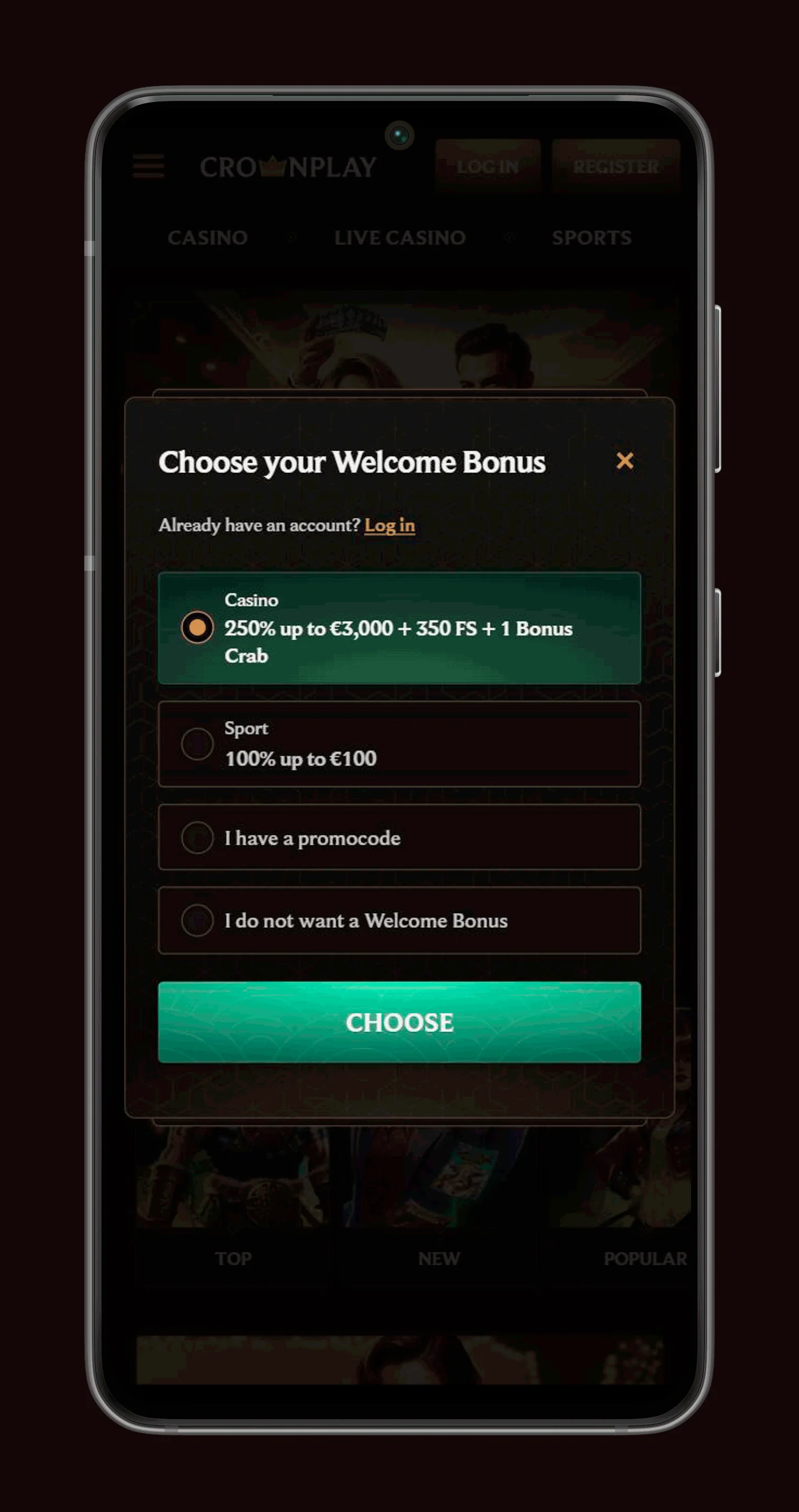
Next, you enter personal details like full legal name, date of birth, country of residence, address, email and mobile number, which lets us confirm you are 18+ and gives us ways to contact you about important things like KYC requests, security alerts and promo updates. Using accurate details is essential because if your name or address does not match your passport or proof of address later, verification and withdrawals will be delayed until everything is corrected.
After that, you set your CrownPlay Casino login credentials by creating a unique username or confirming that you will use your email as the login, and then choosing a strong password that meets our minimum length and character rules. It is a smart move to pick a password you do not use on other sites and to avoid obvious choices like your name plus birth year, since your CrownPlay login protects real money and personal data.
Before you can finish, you need to confirm that you are at least 18 years old and accept the Terms & Conditions, Privacy Notice and Payments rules, which together cover things like bonuses, withdrawals, data handling and responsible gaming. These are all linked directly from the CrownPlay registration page and the footer, so you can always go back and check how specific situations like KYC, self-exclusion or VIP benefits are handled under the licence.
Finally, you activate your account, which in some cases means clicking an activation link sent to your email or entering a PIN sent by SMS to prove that the contact details you provided are really yours. Once activation is done, your profile is live, and you can log in, make your first EUR deposit using methods like Visa, Mastercard, Jeton, MiFinity or crypto, and start exploring casino games, live tables, jackpots and sports markets.
Who can open an account and excluded jurisdictions
CrownPlay is licensed by the Government of Curaçao under licence 8048/JAZ, and as part of that framework, the Terms & Conditions specify that players from certain restricted countries are not allowed to register or play for real money. These excluded jurisdictions are usually places where local law bans online gambling or where regulations conflict with our licence, and the list is maintained in the rules section that you can access from the footer at any time.
If your country is not supported, you should not try to get around the block by using VPNs, proxies, someone else’s address or false personal data, because this breaches our terms and can result in confiscated winnings, cancelled bonuses and permanent account closure once detected. Even in allowed countries, you remain responsible for following local rules about online gambling and taxation, so it is always worth checking your local laws or speaking to support if you are unsure before you complete registration and start playing at CrownPlay.
Managing Your Login Details Securely
Once your account is live, keeping your login safe is a huge part of protecting both your balance and your personal data. You are fully responsible for everything that happens under your username and password, which is why we treat any action made while logged in as coming directly from you, whether that is a deposit, a bet, or a withdrawal request. Using good security habits means you spend less time fixing problems and more time actually playing.
Username and password rules and one‑account policy
Here is the thing: our terms clearly say you can only have one CrownPlay account per person, household and IP unless we explicitly approve otherwise, and that rule sits in the main account and bonus sections of the Terms & Conditions. Opening “extra” profiles to chase more welcome offers or to get around limits counts as multi-accounting, and that can lead to cancelled bonuses, confiscated winnings or full closure of all connected accounts once our security systems or manual checks pick it up. Sticking to one verified profile also makes KYC, payments, VIP progression and support conversations much cleaner, because all of your history sits in one place instead of being split across several usernames.
For passwords, you should always use something unique that is not shared with other sites and that only you know, avoiding obvious choices like your name, date of birth or simple number strings. Never give your login data to friends, family, “tipsters,” or anyone claiming they can “play for you” because any activity from your credentials is treated as done by you, and we cannot distinguish between you and someone you voluntarily shared access with. It is also smart to log out after playing on shared or public devices, not to let your browser save the password on machines other people use, and to change your password from time to time, especially if you ever suspect that somebody else might have seen it.
Keeping your personal information up to date
If you move house, switch phones or get a new email, you should update your profile details in the account section so we can reach you quickly for CrownPlay verification, security alerts or important service messages. Having current contact information makes future withdrawals, VIP reviews and responsible gaming requests smoother and faster, because the compliance and support teams can match your documents and communication channels without confusion. For example, if we need extra KYC before a bigger payout or want to confirm a change in limits, an active email and working mobile number mean we can sort it out in hours rather than days.
If anything important changes, like your legal name after marriage or your residency country after relocating, support may ask for extra documents such as an updated ID or new proof of address to update your account correctly and stay within licence and AML rules. In some cases, a move to a different jurisdiction can affect which payment methods and bonuses you can use or whether we can still offer you real money play at all, so it is always worth getting in touch with support when you make big life changes to keep your CrownPlay profile accurate, compliant and fully usable.
Account Verification and KYC Checks
Now, let’s talk about KYC, because it is something every real money player meets sooner or later once they start depositing and withdrawing. Verification is not just a box-ticking formality for us, it is a legal requirement under our Curaçao licence and one of the main ways we keep CrownPlay safe from fraud, underage play and abuse of payment systems. When your details are fully verified, payouts run smoothly, VIP upgrades are easier to assess, and security checks can be cleared faster when something looks unusual on your account.
Why verification is required and when it is triggered
Verification is required to confirm you are 18+, that the money flowing in and out is genuinely yours and that we are not dealing with stolen cards, chargeback schemes or identity fraud. KYC can be triggered right after registration, before your first withdrawal, when your total deposits or payouts pass certain internal thresholds, or if our systems and manual reviews flag unusual patterns such as rapid deposit and withdrawal cycles, mismatched data or logins from unexpected locations. In some cases, we may also run extra checks when you change key details like address or country, or when you ask for higher withdrawal limits or special VIP treatment, just to make sure everything stays in line with AML and responsible gaming rules.
For VIPs or higher volume players, enhanced checks can kick in based on responsible gaming and AML obligations under the licence, which might include questions about the source of funds or more frequent document updates. This is not about making things hard for you; it is about making sure that higher stakes play is sustainable and legitimate, and that we can keep offering fast payments and personalised perks without running into compliance issues with our regulator.
Documents you may be asked to upload and review timelines
Typically, you may be asked for a set of standard documents that most licensed casinos request. A government-issued photo ID such as a passport, national ID card or driver’s licence is used to confirm your identity, age and sometimes nationality. A proof of address, like a recent utility bill, bank statement or official letter, helps us match your physical address to your profile and check that you are not registering from a restricted jurisdiction. Proof of payment method, which could be a masked card photo, a screenshot from an e-wallet showing your name, or a crypto wallet overview, lets us verify that the cards, wallets or addresses used for deposits and withdrawals actually belong to you.
In some cases, especially for larger withdrawals or VIP level reviews, you might also be asked for extra information about the source of your funds, for example, salary slips, business income or other documents that show where your gambling budget comes from, as part of AML best practices. Once you upload documents through the secure area in your account or send them via approved support channels, the team aims to review them within a reasonable timeframe described in the terms and help pages, usually before processing any pending withdrawals, so that funds can be released without further delays. If anything is unclear or blurry, we will simply ask for a clearer copy rather than leaving you guessing, so using high-quality scans or photos is always a good idea the first time you submit your KYC pack.
Logging In and Resolving Access Issues
Logging in is straightforward, whether you are on desktop or mobile, and the layout keeps the Login button visible at the top of the page.
Logging in on desktop and mobile devices
On desktop, you simply hit “Log In” at the top right, enter your username or email and password, then click to enter your account and access casino, live casino, jackpots or sports sections. The same credentials work in your mobile browser, because CrownPlay is fully optimised for on-the-move betting without a separate app.
You can also use the “Create Shortcut” option described on the site to pin a PWA-style icon to your home screen, giving you app-like access with your regular login.
Forgotten password, username and locked‑out accounts
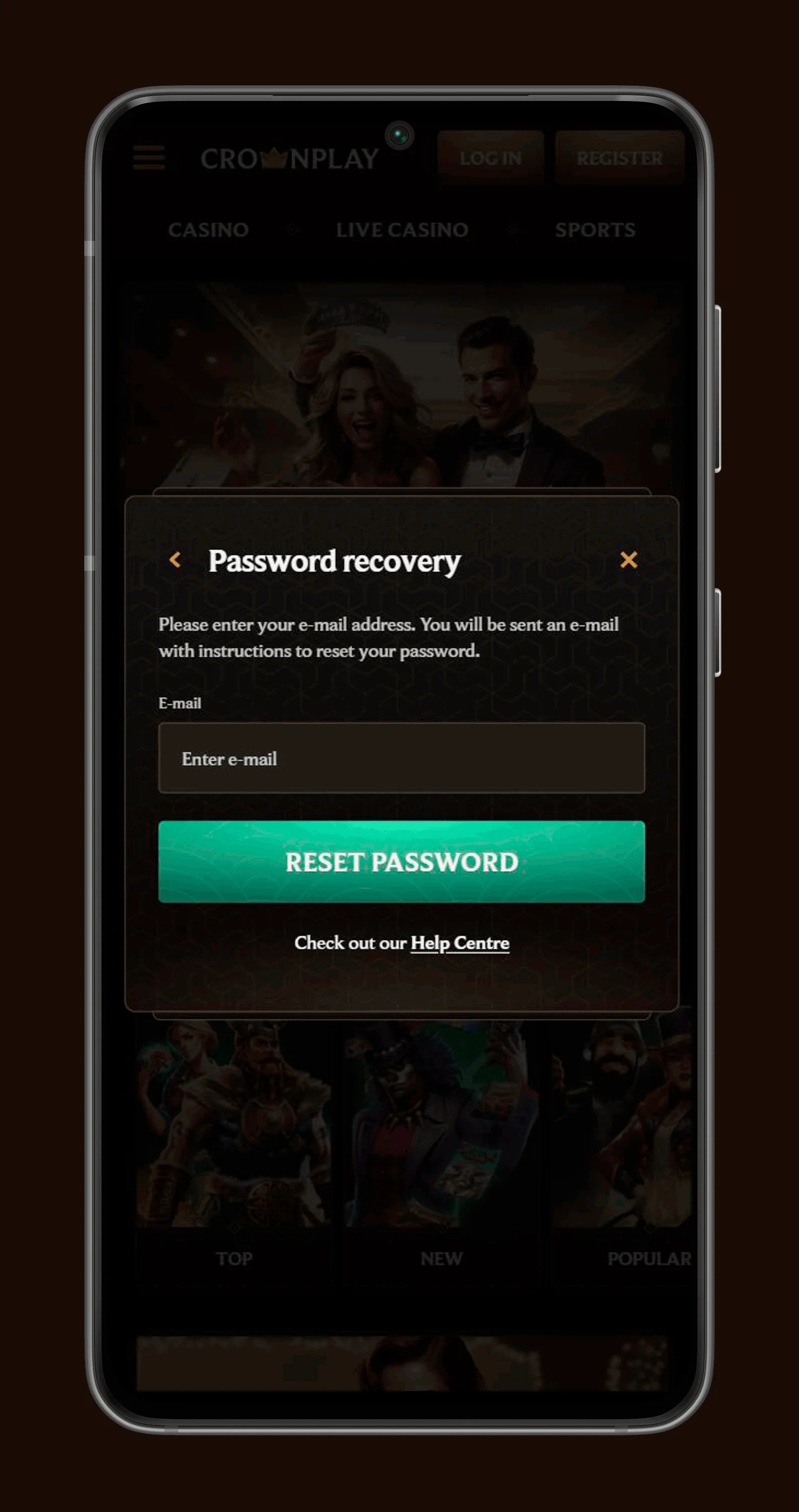
If you forget your password, just select the “Forgot password” link on the login screen and follow the email or SMS reset instructions to set a new one. For username issues, support can help you recover access after confirming your identity through standard security questions or documents.
Locked or temporarily suspended accounts can happen after repeated wrong passwords, security flags or responsible gaming requests, and you will need to contact support to understand the reason and next steps.
Closing, Reopening or Limiting Your Account
Sometimes you need a break, tighten your limits or walk away for good, and that is completely okay. We built several tools to give you control.
Self‑exclusion, deactivation and permanent closure
The Responsible Gaming section explains how you can set daily, weekly or monthly deposit limits, request cool-off periods or activate full self-exclusion if you need to stop gambling entirely for a while. Self-exclusion can be applied for different time frames, and during that period, you will not be able to log in or reopen the account by yourself.
Permanent closure is also available if you decide CrownPlay is not for you anymore, usually done via support with a clear reason, so we can handle any remaining balance correctly.
Reopening your CrownPlay account and related checks
Reopening depends on why your account was closed in the first place. Accounts closed for responsible gaming reasons, especially self-exclusion, follow strict rules and may not be reactivated before the agreed period ends.
If closure was for other reasons, like inactivity or voluntary non-RG closure, support can review your case, run updated KYC/AML checks and confirm if reopening is possible under our licence obligations.